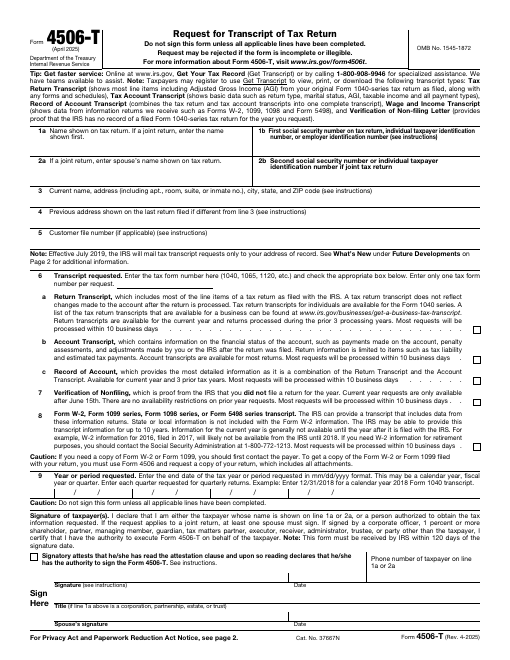
Form 4506-T, Request for Transcript of Tax Return, lets you or an authorized third party (such as a lender) request IRS tax transcripts.
Form 4506-T, Request for Transcript of Tax Return, lets you or an authorized third party (such as a lender) request IRS tax transcripts. Mortgage lenders, colleges and agencies often ask for a signed 4506-T to verify income. Transcripts are free.
Open the form in our online PDF editor to type into the fillable fields, check boxes, add today’s date and sign with your mouse, finger or a typed signature. Preview it free with a watermark, then download a clean, print-ready PDF.
Official U.S. government form. Federal government works are in the public domain. Always check the issuing agency for the newest revision before filing. Issued by: Internal Revenue Service.
How to fill it out online
- Click Edit & fill now to open the form in the online editor.
- Click any field and type, or use the Text tool to type anywhere on the page.
- Use the Check mark tool for boxes and the Date tool for dates.
- Sign with the Signature tool (draw, type or upload).
- Click Preview to review the watermarked copy, then Download for the clean PDF.
Frequently asked questions
Does a transcript cost money?
No. Tax return transcripts from the IRS are free.
Is this the same as a copy of my return?
No. A transcript is a summary. Use Form 4506 to request an actual copy of a return.
Can I send it to my lender?
Yes. Many lenders ask you to sign a 4506-T so they can verify your income.
FillDesk lets you add your signature image to a document. Whether an electronically signed document is legally valid depends on the document type and jurisdiction. This site doesn't provide legal advice.